
Learning streaks and study reminders
Learning streaks help your students build a habit. They are on by default in every school: you don't need to set anything up. Each student sees how many days in a row they have learned, at the top of their My Courses page (subscribers see it above the course list), and can ask for a study reminder email on the days and at the time that suit them.
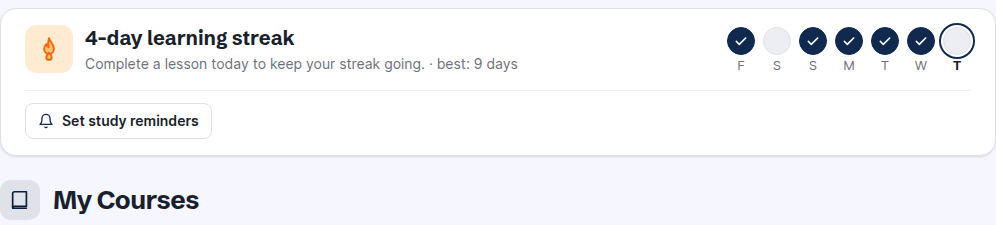
How a streak counts
- A day counts when the student makes progress in a course that day: they mark a lesson as done, or move forward in a SCORM course.
- The streak is the number of days in a row with progress. It stays alive until the end of the next day, so learning in the evening still counts.
- Days follow the student's own time zone, taken from their browser.
- The card shows the current streak, the student's best streak, and their last 7 days, with a tick on each day they learned. It says You learned today. Come back tomorrow to keep your streak. once they have learned today, and Complete a lesson today to keep your streak going. before that.
Study reminders
Reminders are opt-in for each student: nobody gets a reminder email until they ask for one. A student clicks Set study reminders on the card, picks the days (for example Monday, Wednesday and Friday) and the hour, and clicks Save reminders. Turn off stops them again.
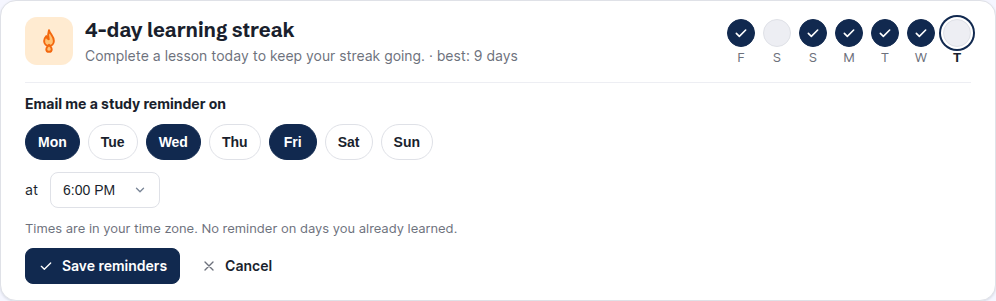
- Reminders arrive at that hour in the student's own time zone.
- No reminder is sent on a day the student has already learned.
- Every reminder email has a Stop these reminders link. It only stops that student's reminders, and nobody else can use it to change them.
Your settings
- The reminder email: in Settings › Email templates, open Study Reminder to change its subject and text, or turn it off. The default subject is Time to learn with {{schoolName}}, and the email links to the student's My Courses page.
- Turn streaks off for your school: in Settings › General, turn on Disable Learning Streaks and Study Reminders. The card disappears and no reminders are sent.
Streaks and reminders are only for your students: nothing changes for visitors who aren't signed in.